Email is great - it's a great tool to facilitate communication both within the library and with the outside world. I do really dislike, however, when it is used exclusively within the library INSTEAD of face-to-face communication. Sometimes a phone call or a visit to another desk *is* the best form of communication. But on the whole, email has been a great boost to productivity. It's a way to shoot off a message/ask a question when someone is unavailable in person, it's a way to create a "paper trail" so you don't lose track of something. It's one of the great inventions of the twentieth century!
My problem with email is that I'm on a couple of VERY active lists, and the amount of posts I receive each day is staggering. I could just delete them, but I do get useful information and I hate to just delete unread. So I'm running way, way behind and several times a day I have to scroll through my messages looking for things from "real people." I'm trying very hard to catch up but am also trying to batch the email reading so I'm not constantly turning to it.
I didn't know a whole lot about IM before reading the "how it works" article, so obviously I've never tried it. The only library application of it that I'm aware of is IM reference service. I think we'd like to try that here once our staffing is improved.<
I also haven't tried text messaging (my cell phone plan does not include it) but I certainly have seen friends use it. It seems a bit cumbersome to me - having to hit number buttons multiple times to get to a particular letter - but I know that people can do it really quickly. I think my library is much more likely to implement IM before doing much with texting.
I've done quite a bit of web conferencing. Some - probably most - has worked really well. Being able to see live demos of a product or get training on an application and at the same time be able to ask your specific questions of someone who really understands the application is invaluable. It's a way we can train many, many more people than we could possibly send to a conference out of town or out of state. But, when web conferencing doesn't work, it's dramatic! There was one notable webinar where about a dozen of our staff people had been freed up to attend, and the Internet connections were soooo sloooow that our screens were about 20 minutes behind what the presenter was talking about! It was a session we had all been really looking forward to - and our library had paid a lot for the webinar - and it was totally useless. When it works, it's absolutely wonderful. When it doesn't, it's pretty frustrating.
Thursday, February 28, 2008

Monday, February 25, 2008
Thing 6 - Image generators

Well, this is WAY fun! I can think of more personal uses than library right now. I'll have to think about that.

Thursday, February 21, 2008
Thing 5 - Playing around


The "Spell with Flickr" mashup is fun. And so is Flickr Sudoku (I'm going to email that to my Sudoku-addicted friends!). Flappr is also fun - I'm not sure there's a really useful purpose to it, though.
I think that Flickr photo-sharing can be really wonderful in personal settings. I can also see that being able to house and share photos could be good to add to a blog. For example, we're going to be doing some remodeling at my library and this would be a great way to house the photos so people can see the process and the progress.

Wednesday, February 20, 2008
Thing 4 - Flickr
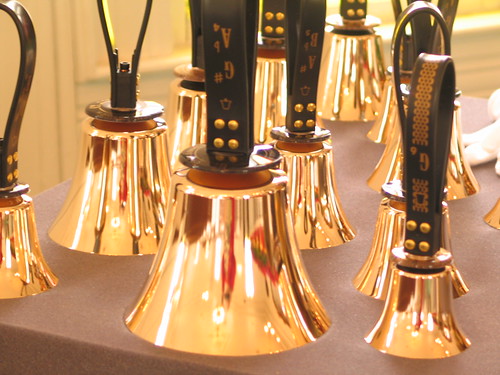
I've heard a lot about people using Flickr and I think I looked around the site a couple summers ago, but this is the first time I've taken a little more time to explore. I looked at the photos that were uploaded on my birthday, and then I looked for photos from the Lake District in England, where I was a couple summers ago. Some people are truly amazing photographers! I like that this is a way to protect photographs from fire, computer crashes, etc. So I may need to look into this for my photos at home. I've had a digital camera for a little over a year and have uploaded lots of photos to my computer but haven't printed many yet. Flickr would be a good backup mechanism.
Next day.....well, trying to upload the photo didn't work well. I asked a coworker who blogged that she was finally able to do it with someone else's help, and that worked....sort of. The photo I was trying to do just showed up as a big white blank spot in my blog. And I tried another one of the same person's shots and had the same result. So for some reason she doesn't want anyone to be able to use her photos, I guess. They weren't labeled in any way. So I've looked for another photo (taken by "GA music maker") and was able to get it to display.
Here's the link:
And here's the relevant part of the instructions for why the first photo I wanted wouldn't work:
The things I wanted to paste in above - the link and the instructions - show down below but not in line with the rest of the text. Sigh. I'm going to publish this and go on.
Tuesday, February 19, 2008
Son of Thing 3 - RSS
Yep - pretty easy to read quickly through blogs using a reader. So I really should have figured this out before!!!!!!!!
Thing 3 - RSS
The problem that I have with blogs is that I forget/don't have time to go back and read them. So RSS should be a great help for that - right?? Now I just need to really MAKE time to check my Bloglines account. I had set this up after a workshop last summer and it was indeed very easy. And there are so many blogs out there on such an incredible variety of topics that it would be pretty easy to spend nearly all your time reading blogs! Not such a great thing in the workplace!
But I did add some that I had bookmarked in my browser and I will make a point of trying to stay caught up. I have some others bookmarked on another computer that I'll look at and probably add to Bloglines.
As far as which tool was easier, when I set up the Bloglines account last summer, I did a little exploring and did find interesting blogs. But what I think will work better for me is rather than searching for blogs, I need to take note of blogs that I come across other ways - journal articles, listserv emails, websites, etc. - and follow through that way.
OK - off now to check Bloglines!
But I did add some that I had bookmarked in my browser and I will make a point of trying to stay caught up. I have some others bookmarked on another computer that I'll look at and probably add to Bloglines.
As far as which tool was easier, when I set up the Bloglines account last summer, I did a little exploring and did find interesting blogs. But what I think will work better for me is rather than searching for blogs, I need to take note of blogs that I come across other ways - journal articles, listserv emails, websites, etc. - and follow through that way.
OK - off now to check Bloglines!
Subscribe to:
Posts (Atom)


